

DisplayPort 2.1 Cable ODM Selection Guide for Hardware Brands
2026-10-24
Every hardware brand chasing 8K, high-refresh, or multi-display setups knows the signal chain is only as strong as its weakest link. For DisplayPort 2.1, that link is almost always the cable—and picking the right ODM partner is where margins are won or lost. This guide skips the fluff and focuses on the selection criteria that actually predict long-term reliability and cost control. If you're serious about differentiating your product line, EBCYX offers insights that go beyond the typical datasheet.
Separating DisplayPort 2.1 ODM Claims From Lab-Backed Reality
Many ODM sheets wave the DisplayPort 2.1 badge without specifying which UHBR tier—10, 13.5, or 20—actually passes the connector. A display that merely accepts a DP 2.1 input signal gets marketed as fully compliant, even when its internal scaler runs at a lower lane count or the firmware negotiates a fallback link rate.
Lab tests paint a starker picture. Repeated signal integrity runs at the full 80 Gbps ceiling often reveal excess jitter, flaky handshakes, and intermittent black screens that never surface in a short demo loop. Cables that look identical on a spec table can diverge wildly once the tester stresses the active redriver or the retimer beyond a two-minute window.
The easiest separation is to ignore the marketing header and ask for the UHBR certification ID, the exact bit rate under load, and a screenshot from a protocol analyzer rather than a simple EDID readout. If those elements are missing, the DisplayPort 2.1 label is closer to an aspiration than a lab-backed result.
Bend Tests That Expose Weak UHBR20 Cable Shielding
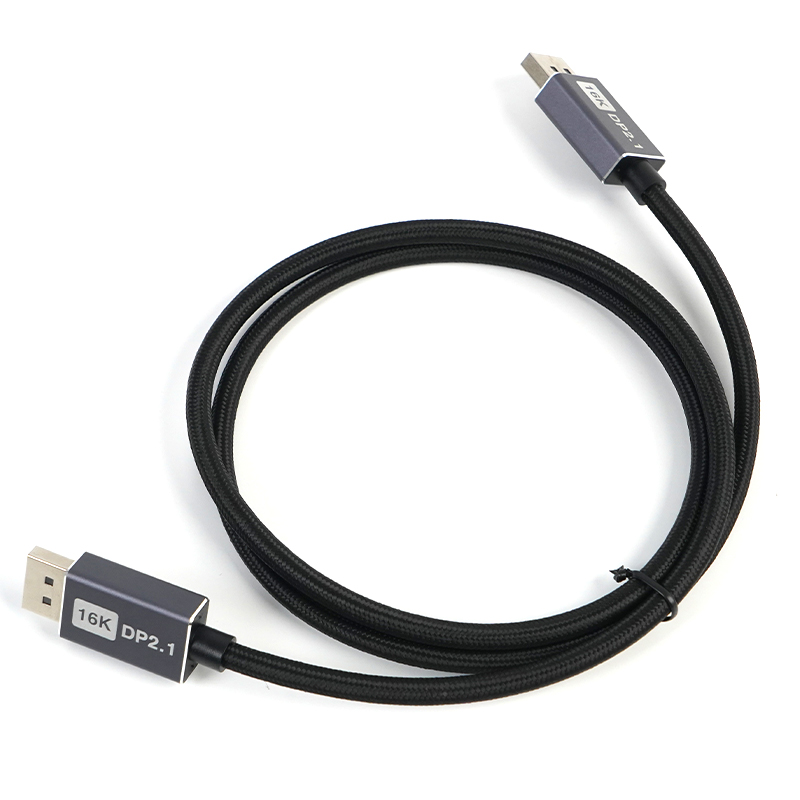
Repeated flexing quickly reveals how well a UHBR20 cable's shielding holds up under real-world handling. At 20 Gbps per lane, even tiny gaps or cracks in the shield let signal energy escape and external noise creep in. Bend tests simulate coiling, routing through tight spaces, and the occasional tug, exposing weaknesses that static measurements miss.
A common approach is to cycle the cable around a mandrel with a radius close to the cable's minimum bend specification while monitoring shielding effectiveness or return loss. Early in the test, most cables appear fine, but as the jacket and foil layers fatigue, localized shielding breakdowns emerge. These often show up as sharp dips in high-frequency performance at specific bend angles.
Some designs fail after only a few hundred cycles, with shield resistance climbing and bit error rates spiking once the cable is repositioned. The worst offenders tend to use thin foil wraps or poorly bonded drain wires that pull away from the connector. Better-performing cables rely on multiple shield layers or more resilient materials that maintain continuity even when flexed repeatedly.
Connector Plating Decisions That Shape DisplayPort 2.1 Cable Life
Everyone wants to blame cable failures on broken wires or cheap solder joints, but the connector plating is usually the first thing to go bad, especially on DisplayPort 2.1 hardware. The UHBR20 signal rate leaves almost no room for contact resistance drift. A few extra milliohms at the mating interface and the eye diagram closes up, so the plating choice isn't just cosmetic. Thin gold flash might look fine out of the box, but those microscopic pores in the gold let moisture and sulfides reach the nickel underplate. Once the nickel starts corroding, you get a high-resistance film that no amount of wiggling will fix.
Hard gold with a bit of cobalt or nickel alloyed in is the workhorse here, typically 15 to 30 microinches over 50 to 100 microinches of nickel. The nickel isn't just a cost saver; it acts as a diffusion barrier and a load-bearing layer under the soft gold. But here's where cable makers get burned: after a few thousand insertion cycles, that gold wears thin at the contact points and the nickel underneath starts oxidizing. Nickel oxide is a semiconductor, not a conductor, so the contact resistance jumps way beyond what DisplayPort 2.1 can tolerate. Palladium-nickel alloy finishes survive more cycles because they're harder, but they need higher normal force to maintain a stable connection, and if the shell design doesn't compensate, you'll see intermittent link training failures at 20 Gbps per lane.
Environmental testing tells the rest of the story. Mixed flowing gas tests with hydrogen sulfide and chlorine show that gold-cobalt alloys hold up better than pure gold, simply because the cobalt refines the grain structure and slows pore formation. But you can't just plate everything thicker and call it done. Overly thick gold on the blade contacts can lead to cold welding or galling in high-cycle applications, and if the transition zone between selective gold and tin plating on the same pin isn't properly masked, galvanic corrosion will eat the tin in humid conditions. These are the decisions that separate a cable that survives two years of daily use from one that degrades silently until the display starts flickering.
Factory Audit Red Flags Most Hardware Brands Walk Past
Walking through a supplier's floor, you notice the calibration stickers on torque wrenches are faded or missing. Most brands nod and move on, treating it as a minor housekeeping issue. But in hardware manufacturing, an uncalibrated tool isn't just a risk—it's a silent statement about the entire quality culture. When torque specs drift by five percent on a structural bolt, the failure might not show up for years, long after the shipment has cleared customs and the invoice is paid.
Another red flag that gets routinely ignored is the absence of first-article inspection reports for revised parts. A factory might show you a beautiful sample, but if they can't produce the dimensional data from the very first run of that revision, you're essentially trusting them to have guessed correctly. Hardware brands often accept verbal assurances instead of pushing for the raw measurement sheets. The difference between a supplier who keeps those records and one who doesn't is the difference between catching a thread mismatch before production and discovering it during a recall.
Then there's the tooling storage area. Rust on injection mold cavities, dies stacked without protective coating, or fixtures left on a damp concrete floor—these are all dismissed as cosmetic or 'normal for the region.' But tooling is the genetic code of your hardware product. If it's not treated as a precision asset, every batch that comes off that line inherits the same neglect. Smart brands don't just audit the finished parts; they audit the respect the factory shows its own equipment.
Cable MOQs and Lead Times Without Delaying a Product Launch
Locking cable specs early is the single biggest lever for keeping MOQs and lead times from derailing a launch. Instead of treating the harness as an afterthought, involve your cable supplier during the prototype phase. Ask for their stock cable library or semi-custom options—these often carry lower minimums and shorter lead times than fully bespoke constructions. If you can design around an existing UL-listed cable or a connector already in their inventory, you’ll avoid the 8–12 week wait that comes with new tooling or special compound runs.
For the quantities you do need to order, split the risk rather than waiting for a perfect forecast. Place a smaller initial PO that covers engineering builds and pilot units, then negotiate a rolling forecast with the cable assembler. Many shops will hold raw materials or reserve capacity if you commit to a schedule, even if the final release quantities shift. And don’t overlook regional suppliers for low-volume runs—they often have more flexible MOQs than large global manufacturers, and shorter shipping distances cut another week or two off the timeline.
ODM Quality Clauses That Keep First-Batch Quality From Fading
The samples that win a contract usually get polished in ways the production line never will. That gap is where quality quietly erodes unless the agreement spells out that the exact process settings, material grades, and equipment used for those approved first articles are the same ones required for every subsequent run. A locked-process clause is blunt but effective: it forbids the factory from switching to a cheaper resin, shortening a curing cycle, or drifting to a faster line speed just because the spec sheet still technically matches.
Change control has to carry real friction. The contract should require written approval before any component, sub-supplier, or production step changes hands, and it should state plainly that unapproved substitutions are a breach, not a minor paperwork lapse. Pair that with the right to send an inspector or third-party auditor during running production, not just at the pre-shipment stage, and the factory's incentive to quietly optimize away your margins drops sharply.
Finally, the quality clauses need teeth that can be measured without a lab full of engineers. Set a defect ceiling per lot, a cap on dimensional drift, and a requirement that any single month of rising complaints triggers a re-run of the full first-article approval at the supplier's cost. When the contract makes fading quality more expensive than maintaining it, consistency tends to survive long past the first container.
FAQ
A solid ODM for DP2.1 cables should offer more than crimping and soldering. Look for experience with high-speed differential pair routing, precise overmolding of the connector area, tight control of shield braid coverage, and eMarker programming that matches the actual cable performance. They should also have in-house pre-compliance testing for UHBR20 link training and be able to explain how they manage insertion loss at 20 Gbps per lane across different cable lengths.
Low quotes often come from hidden compromises: thinner copper conductors, reduced shield coverage, cheap connector alloys, or skipping genuine high-frequency validation. With DP2.1 UHBR signaling, these shortcuts lead to intermittent black screens, failed link training, or cables that only work at lower data rates. The real cost shows up later in return rates and field failures, so pricing should be evaluated against a detailed bill of materials and test evidence.
Ask for insertion loss and return loss plots up to at least 10 GHz, a TDR impedance profile showing controlled impedance along the cable, eye diagram margin analysis at UHBR20, and a valid VESA certification certificate from an authorized test lab. If they only provide a continuity or pinout check, that is not enough for DisplayPort 2.1 data rates.
Press them on practical details: what raw cable attenuation they allow per meter at 10 GHz, how they terminate the connector to minimize reflection, which dielectric material they use for the inner insulation, how they configure the eMarker for DP Alt Mode, and why certain longer lengths require active amplification. A real UHBR20 partner can walk through the signal integrity budget and explain the tradeoffs between length, gauge, and active components.
Use an AQL-based sampling plan and pull random cables from each production lot. Run vector network analyzer measurements for insertion loss and return loss at the critical UHBR20 frequencies, read back the eMarker content to verify it matches your approved configuration, X-ray the connector solder joints for voids, and perform a pull test on the strain relief. Always compare against a golden sample approved during pilot production, and reject lots that drift outside your agreed tolerance window.
Require the ODM to use length-specific cable designs, not one wire gauge for everything. A 1-meter passive cable can use thinner conductors, while a 3-meter cable may need a thicker gauge or active retimers. Have them provide eye diagram margin data for each length at full UHBR20 bandwidth, lock down the critical components like connectors, insulating foam, and eMarker chips, and include a clause that any component change requires re-validation and your written approval.
Conclusion
Hardware brands frequently walk into ODM pitches where UHBR20 performance is claimed but not proven. A lab-backed comparison of signal integrity and shielding should precede any contract. Simple bend tests around a mandrel quickly reveal which cable constructions lose shielding effectiveness under stress, and that early data is more useful than marketing decks. Connector plating thickness and material choices also need scrutiny: a few microns less gold or a switch to flash plating can turn a once-reliable cable into a corrosion-prone return headache six months after launch.
Factory audits should not be a checkbox exercise. Red flags like undocumented process changes, untrained soldering lines, or inconsistent incoming inspection records often signal batches that drift from the approved sample. Ask for quality clauses that lock the exact materials, plating specs, and test methods into the purchase agreement so first-batch quality does not quietly fade. Finally, treat MOQ and lead time as design inputs, not afterthoughts: phased delivery schedules, shared tooling costs, or buffer stock agreements can keep a product launch on track without forcing a brand to absorb excess inventory.
Contact Us
Contact Person: David Yang
Email: [email protected]
Tel/WhatsApp: 8615814734054
Website: https://www.ebcyx.com/