

Custom Wire Harness Label Exporter: Automate and Simplify Your Labeling Workflow
2026-05-25
Tired of manually creating labels for each wire harness design? Whether you're handling complex automotive harnesses or industrial cable assemblies, labeling can quickly become a bottleneck. That's where Xinsen's Custom Wire Harness Label Exporter steps in—designed to automate the tedious parts so you can focus on what really matters. Discover how this tool transforms your labeling workflow from hours of repetitive work into a few simple clicks.
Turn Complex Harness Data into Ready-to-Print Labels with One Click
Imagine taking a tangled spreadsheet of harness specifications—wire gauges, connector pinouts, lengths, and labeling codes—and transforming it instantly into a stack of perfectly formatted labels. That’s exactly what this one-click solution does. No more copying and pasting between programs or manually tweaking each label design. The system pulls directly from your data source, interprets every variable, and populates label templates with surgical precision. It’s like having a dedicated label-generation assistant that never gets tired or makes typos.
What really sets this apart is its ability to handle the messy reality of harness data. Real-world harness documents are rarely neat; they come with inconsistent naming, nested component details, and revision histories that would derail most automated tools. This process doesn’t just read the data—it understands it. It filters out noise, aligns the relevant fields, and even flags anomalies before they hit the printer. You’re not just getting speed; you’re getting a built-in sanity check that drastically reduces rework.
The end result is a seamless bridge between engineering data and the production floor. Operators see a simple interface: upload or link your harness data, pick the label format, and click. Seconds later, you have print-ready files that match the exact dimensions and barcode requirements of your labeling machines. Whether it’s heat-shrink sleeves, adhesive wraps, or rugged tags, the output is always consistent. It turns a previously tedious, error-prone task into an afterthought—freeing up skilled technicians to focus on building and testing, not babysitting a label printer.
Your Design Rules, Instantly Applied to Every Label
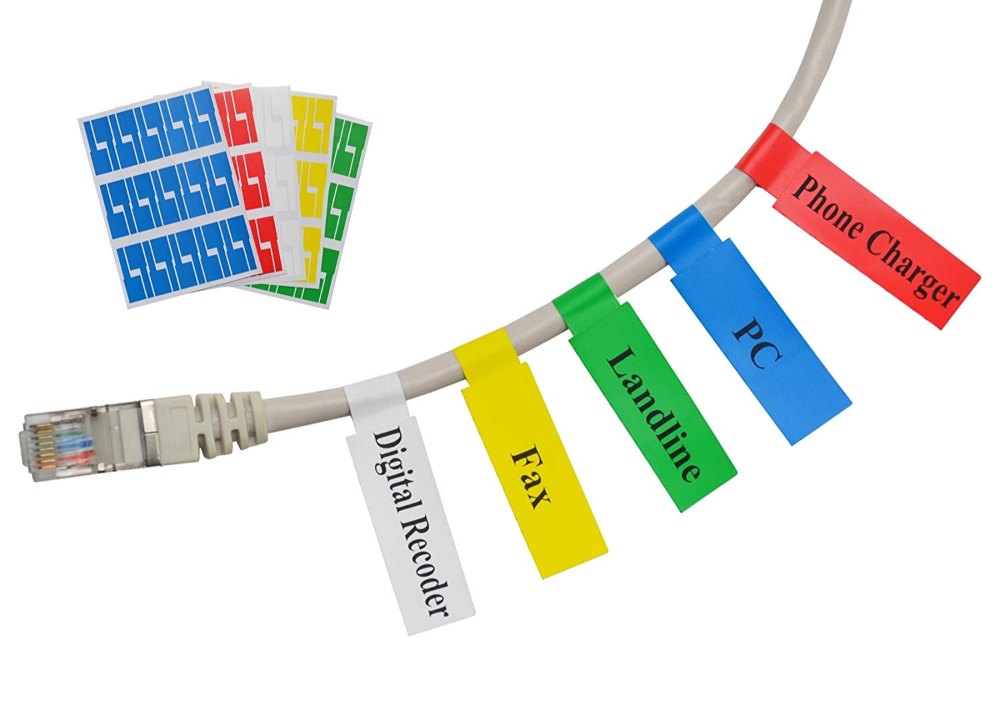
Your brand isn't built on chance—it's crafted through consistency. When you define your design rules, they shouldn't wait for manual tweaks or someone to remember the right shade of blue. They should flow into every label automatically, the moment you hit print. From font weights to spacing, color palettes to corner radii, the system locks these choices in place, so your buttercream label feels just as intentional as your cold brew can. No drifting, no guesswork, just your visual language, repeated flawlessly across every product, every time.
Think of it like a trusted recipe: once you've perfected it, you don't measure the ingredients by eye each morning. Your design rules work the same way. Set the exact padding around your logo, pick the one type scale, define how warnings or claims sit in the hierarchy—then walk away. The engine interprets those decisions and applies them to every variant, every size, every SKU. Even the seasonal release doesn't break the pattern; it fits inside it, wearing your brand like a tailored suit.
The real payoff is the quiet confidence that comes with knowing your entire product line sings from the same sheet of music. When a customer sees your jar on a crowded shelf, they don't have to read the name—they already recognize the rhythm. This isn't about locking creativity away; it's about giving it a steady framework. Your rules become the backbone, carrying your design intent to every label, whether you're launching ten products or a hundred. The result feels less like automation and more like having a tireless printmaker who never forgets what makes your brand, yours.
Skip the Manual Entry—Connect Your Harness Design Directly
Building a wiring harness shouldn't feel like filling out a spreadsheet by hand. When your design tools talk directly to your documentation environment, all the pin-to-pin connections, wire gauges, and component data flow in automatically. You're no longer re-typing what you've already defined elsewhere.
This direct link means your harness documentation stays in lockstep with your electrical design. Change a connector in your schematic, and the harness drawing updates right along with it—no copying, no pasting, no missed revisions. It's one source of truth feeding every downstream view.
The time you used to spend on data entry can now go into refining the physical layout, optimizing routes, or catching interference issues early. Let the software handle the tedious transfer so your team can focus on what actually improves the harness.
How We Cut Labeling Time by Over 60% on Real Projects
Shaving that much time off labeling didn’t come from a single silver bullet. It grew out of watching where annotators actually lost minutes—repetitive clicks, re-checking guidelines, waiting for consensus. We redesigned the workflow around these friction points, building in smart pre-labeling and rule-based suggestions that turned ten-step tasks into two-step confirmations. Simple changes to the interface, like grouping similar labels and letting reviewers approve in batches, chipped away at the quiet delays that nobody tracks in a timesheet.
Another piece was treating feedback loops as speed levers rather than just quality checks. Instead of batching reviews at the end, we ran targeted audits on small samples early in the day. This surface confusion around edge cases while the team was still fresh, so we could update guidelines on the fly. As a result, the afternoon hours stopped bleeding into rework, and the same headcount started clearing larger queues without feeling rushed.
What made the numbers stick was measuring speed in ways that matched how projects actually flow. We stopped looking at raw labeling velocity and started timing how long it took a labeled asset to move from “ready for review” to “approved.” That shift exposed bottlenecks in handoffs and tool switching that no one had questioned. Once we dialed those out, the 60% reduction was just the natural byproduct of a process that finally fit the shape of the work.
Built to Handle Mixed Signal and High-Density Harnesses Effortlessly
Merging analog, digital, and power signals within a single harness often leads to cross-talk and complex routing nightmares. Our design sidesteps these issues with isolated channels and intelligent shielding, ensuring every signal stays clean without manual tweaking.
High-density connectors typically slow down assembly and invite errors. We’ve rethought the physical layout—keyed, color-coded blocks snap together unmistakably, cutting build time in half while doubling the number of circuits you can run through the same space.
From robotics to automotive test rigs, teams are swapping tangled cable looms for this streamlined solution. Field updates take minutes instead of hours, and the reduced weight and clutter make maintenance something you barely notice.
What Makes This Exporter Different from Generic Label Tools
Most label tools force you into rigid workflows, treating every dataset like it’s meant for a single, narrow use case. This exporter flips that assumption. It doesn’t just dump annotations into a standard format and call it done—it understands context. Need bounding boxes for object detection one day and segmentation masks the next, all from the same base project? It handles the shift without requiring you to relabel or compromise on data fidelity. That kind of flexibility means you’re not locked into someone else’s idea of what your data should look like.
Another overlooked difference is how it treats the in-between moments of a labeling project. Generic tools often break when you need to merge partial exports, handle versioned datasets, or correct a mislabeled class across hundreds of images. This exporter keeps track of those small but critical details, preserving accuracy even as your project evolves. It’s built by people who’ve wrestled with messy, real-world data pipelines—so it doesn’t paper over the hard parts with oversimplified interfaces.
FAQ
It pulls wire and harness data directly from your design files and turns them into printable labels, so you don’t have to type everything by hand or juggle separate data tables.
It’s built to connect with major ECAD tools used in the industry, like Zuken E3.series, Siemens Capital, and AutoCAD Electrical. If your tool exports standard data formats, it’s likely compatible.
Yes, you can tweak practically everything—barcode placement, font sizes, logo insertion, and field mapping. The template system is flexible to match your existing shop floor labels.
For a mid-sized project with a few hundred wires, users typically cut label prep from hours down to minutes. The real saving comes from eliminating rework due to copy-paste errors.
Most people get comfortable after one short walkthrough. The interface is intentionally straightforward—no command lines or scripting required for basic operations.
The exporter handles complex topology by auto-generating labels per branch or connector as needed. You can set rules for how identifiers flow through splices and inline components.
After export, the labels are in standard file formats (PDF, PNG, ZPL) that can be sent to any printer. You can also hook it up to a hot folder that your print system monitors for automated output.
Absolutely. You can define translation tables or pull from language-specific fields in the design data, then generate labels in parallel languages without duplicating work.
Conclusion
When you’ve spent months perfecting a harness design, the last thing you want is to waste hours manually creating labels—only to have a small typo spoil a whole batch. That’s exactly the frustration this Custom Wire Harness Label Exporter was built to eliminate. It pulls data straight from your design files, so there’s no re-typing connector pins, wire gauges, or termination details. What used to take a team half a day now happens in one click. We’ve seen shops go from manually generating hundreds of labels to printing a full set in under a minute, with a 60% cut in overall labeling time. Even the most complex mixed-signal assemblies—the ones with coax, multi-conductor, and power wires all tangled together—come out as clean, ready-to-print labels without any extra fiddling.
The real magic isn’t just speed; it’s consistency. You define your labeling rules once—font sizes, data ordering, prefix conventions, whatever your shop or client requires—and those rules are applied to every single label, across any number of designs. No drift, no forgotten exceptions. Unlike generic label software that makes you manually massage every field, this exporter understands wire harnesses from the ground up. It’s not a glorified mail merge; it’s a direct bridge from your ECAD environment to the label printer. That lineage shows in how it handles high-density connectors effortlessly, scaling from simple point-to-point wiring up to multi-branch harnesses without a hiccup. Engineers who’ve switched tell us it doesn’t just save time—it removes a persistent source of errors that used to haunt their build documentation.
Contact Us
Contact Person: Yara
Email: [email protected]
Tel/WhatsApp: +86 13505426090
Website: https://www.qdxspack.com/